Skip to content

AI-assisted visual CMS

Build visually. Review clearly. Publish with control.

Create your website in a visual workspace, review AI-assisted changes before applying them, and manage content and customer work with the tools you need.

Self-hosted software. Signed installer release pending.

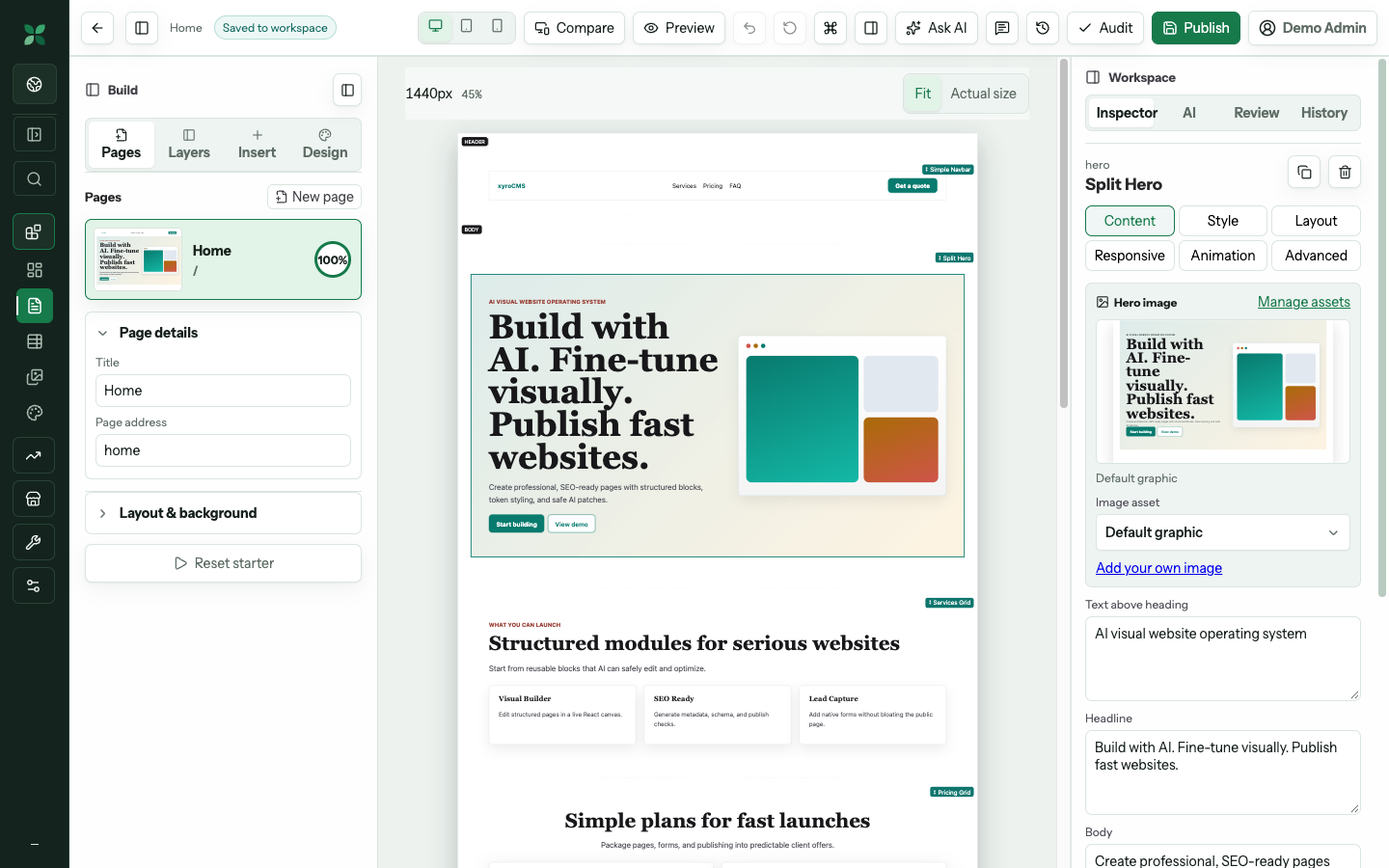
Demo xyroCMS visual editor with page controls, a live website canvas and an inspector.

Demo workspace — page controls, live canvas and review tools. Open “See the workspace” for the full-size demo image.

Start simple. Go deeper when you need to. A focused workspace keeps everyday tasks close. Advanced tools remain available as your site grows.

A clear path from idea to live site

From first draft to a deliberate publish.

Work visually, keep your decisions visible, and publish when you’re ready.

01 — Build

Start with a template, shape your page visually, and keep content and design together.

02 — Review

Inspect proposed changes, compare the result, and decide what to apply. Your draft stays separate from your published site.

03 — Publish

Check site readiness, then publish your saved pages. The public site keeps editor tools out of its runtime.

One connected workspace

Tools for the work around your website.

Use the core workspace and the modules that fit your business. Provider features need their own configuration.

Create and maintain content

Build pages, reuse your brand, manage media and maintain structured content. Visual editor · Brand Kit · Media library · Collections.

Understand and improve your site

Review SEO setup, measured analytics and checks before publishing. SEO · Analytics · Readiness.

Keep customer work moving

Collect enquiries, follow up with leads and manage support conversations. Forms · Leads · Support · Work to do.

Run your business workflows

Manage products and orders, prepare social content, and review assisted tasks. Products and orders · Social · Assistants · Automations. Manual social handoffs; payment and delivery providers need separate configuration.

Free core. Add the modules you need.

Each paid module is priced individually in US dollars. Choose monthly or yearly billing for each module. Subscription checkout is not available yet.

xyroCMS core

Free

  • Core website workspace
  • No core subscription fee
  • Self-host on your own infrastructure
Installation guide

Self-hosted software

Your website. Your installation.

Run xyroCMS on your own infrastructure and keep the workspace and published site separate. Server setup needs an experienced operator; website editing is designed to stay approachable.

Signed installer release pending

The native VPS installer has been implemented, but a signed public release and its live-host acceptance are still pending. A download will be added after that release is available.

What you need

A clean dedicated Ubuntu 24.04 VPS, amd64 architecture, domain and DNS access, and an operator to manage setup and backups.

What installation involves

The planned release flow verifies the release, prepares the server, then opens a browser setup wizard for the owner account and authenticator. Optional providers are configured separately. Shared hosting is not supported by this native VPS installer.

Before you begin.

Do I need technical experience?

Website editing starts with a visual workspace and Simple view. Advanced view exposes more tools when you need them. Installing and operating the server needs technical experience.

What does xyroCMS cost?

Core is free. Each paid module is US$4.90 per month or US$49.90 per year. Prices apply to each module separately. Subscription checkout is not available yet.

Can I install it today?

The signed native release and live-host acceptance are still pending. This page does not currently provide an installer download.

Where does xyroCMS run?

The native installer targets a clean dedicated Ubuntu 24.04 amd64 VPS. Provider-dependent features need separate configuration. This installer does not support shared hosting.

Will AI publish changes for me?

AI-assisted edits are proposed for review. Applying a proposal changes the draft. Publishing is a separate authorized action after readiness checks.

Are updates and social posting automatic?

Updates are currently operated manually. Saved Automatic preferences do not run an updater. Social supports drafts, review and manual handoffs; automatic posting and live social connections are not available in the current implementation.